Building my own K3s cluster — Part 2. Companion piece to Part 1, published 28 September 2025. Every figure below was read live off the cluster on 17 August 2026.
Part 1 ended on the best sentence in homelabbing: all three nodes show Ready. It is also the sentence that tells you nothing about whether the thing will survive a Tuesday.
I published Part 1 on 28 September 2025: three second-hand HP EliteDesk 800 G3 Minis, $240 all in, one master at 192.168.30.10 and two workers at .11 and .12. Ubuntu Server, K3s, three green Ready lines, and a promise that Part 2 would cover VLANs, monitoring and Rancher.
It covers those. It also covers a six-day outage nobody noticed, a hardware diagnosis I got completely wrong, and a rack — because between those two paragraphs the cluster stopped being a lab and started being the thing my house and my consultancy actually run on. That changes which mistakes are affordable.
What Part 1 called workers are now masters, and that is not a rename
The single biggest change is one that a screenshot cannot show. Part 1's cluster had one control plane, backed by SQLite. If that box died, the cluster did not degrade — it stopped. No scheduling, no kubectl apply, nothing.
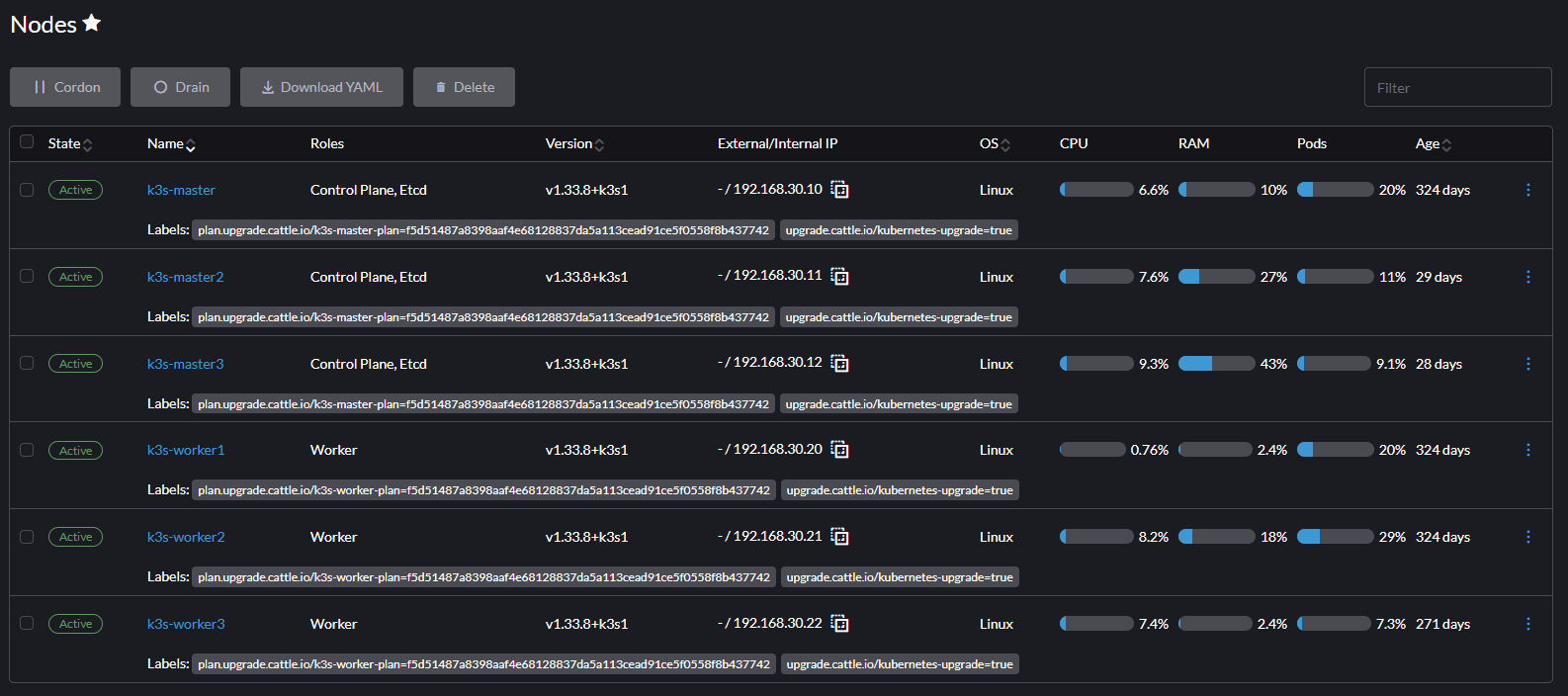
On 12 July 2026 the datastore migrated from SQLite to embedded etcd, and on 19–20 July two more Minis joined as full control planes. The cluster went from one master and three workers to three masters and three workers. Because the two new machines took the addresses Part 1's workers held, every worker was renumbered at the same time:
- Masters live at .30.10, .30.11, .30.12.
- Workers live at .30.20, .30.21, .30.22.
- That scheme is fixed for life. Static in netplan, with matching DHCP reservations so nothing else can ever take one.
Both blocks are on VLAN 30, behind a UniFi gateway, which is the networking half Part 1 promised. The cluster has no route to the general house LAN except the ones I opened deliberately.
$ kubectl get nodes -o wide

k3s-master    Ready  control-plane,etcd,master   v1.33.8+k3s1   192.168.30.10
k3s-master2   Ready  control-plane,etcd,master   v1.33.8+k3s1   192.168.30.11
k3s-master3   Ready  control-plane,etcd,master   v1.33.8+k3s1   192.168.30.12
k3s-worker1   Ready  worker                      v1.33.8+k3s1   192.168.30.20
k3s-worker2   Ready  worker                      v1.33.8+k3s1   192.168.30.21
k3s-worker3   Ready  worker                      v1.33.8+k3s1   192.168.30.22
Part 1's version of this was three lines. The interesting column is not the count — it is etcd appearing three times, because that is the part that decides whether losing a machine is an inconvenience or an outage.
Three control planes buy you exactly one failure, and the arithmetic is unforgiving
This is the part I most want someone building their second cluster to internalise, because it is counter-intuitive and it is not a preference.
etcd needs a majority of its members, not "at least one". Three masters means two must stay up. Lose a second and the API server freezes cluster-wide: pods already running keep running, but nothing new schedules, nothing terminates cleanly, and kubectl apply hangs.
The tempting response is to add a fourth master. It does not help. Four members raise the quorum to three, so one dead member still leaves you with exactly zero margin — you have added a machine and bought nothing. Tolerance goes up at five, not four. And a dead member has to be removed from the cluster before a replacement is added, which is itself a delicate operation.
Workers do not count toward quorum at all. That is why this design puts the money into three matched control planes rather than a fourth worker.
Two nodes went dark for six days, and nothing told me
On 27 July 2026 k3s-worker3 stopped posting to the API and vanished off the network at the same instant — no ARP entry, no switch presence, but the box was powered and the fan was running. Three days later k3s-master did the same thing, and I caught its fan running hard just before it went.
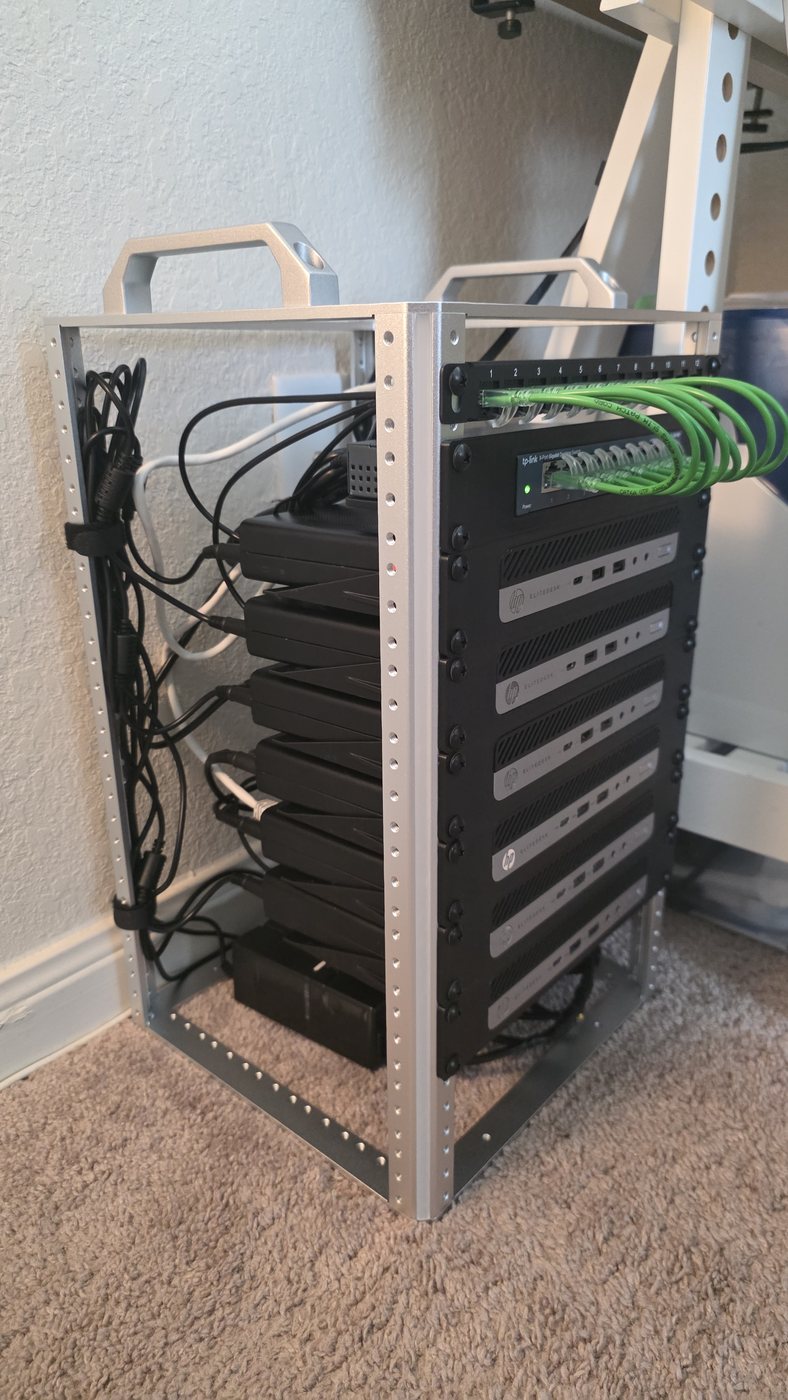
The cluster itself was fine. Quorum held on master2 and master3, which is precisely what the July HA migration was for. What was not fine was that at that moment all six machines were stacked loose on a shelf, waiting on 3D-printed rack trays that were weeks out. Stacking those Minis blocks the top and bottom vents of every machine in the pile.
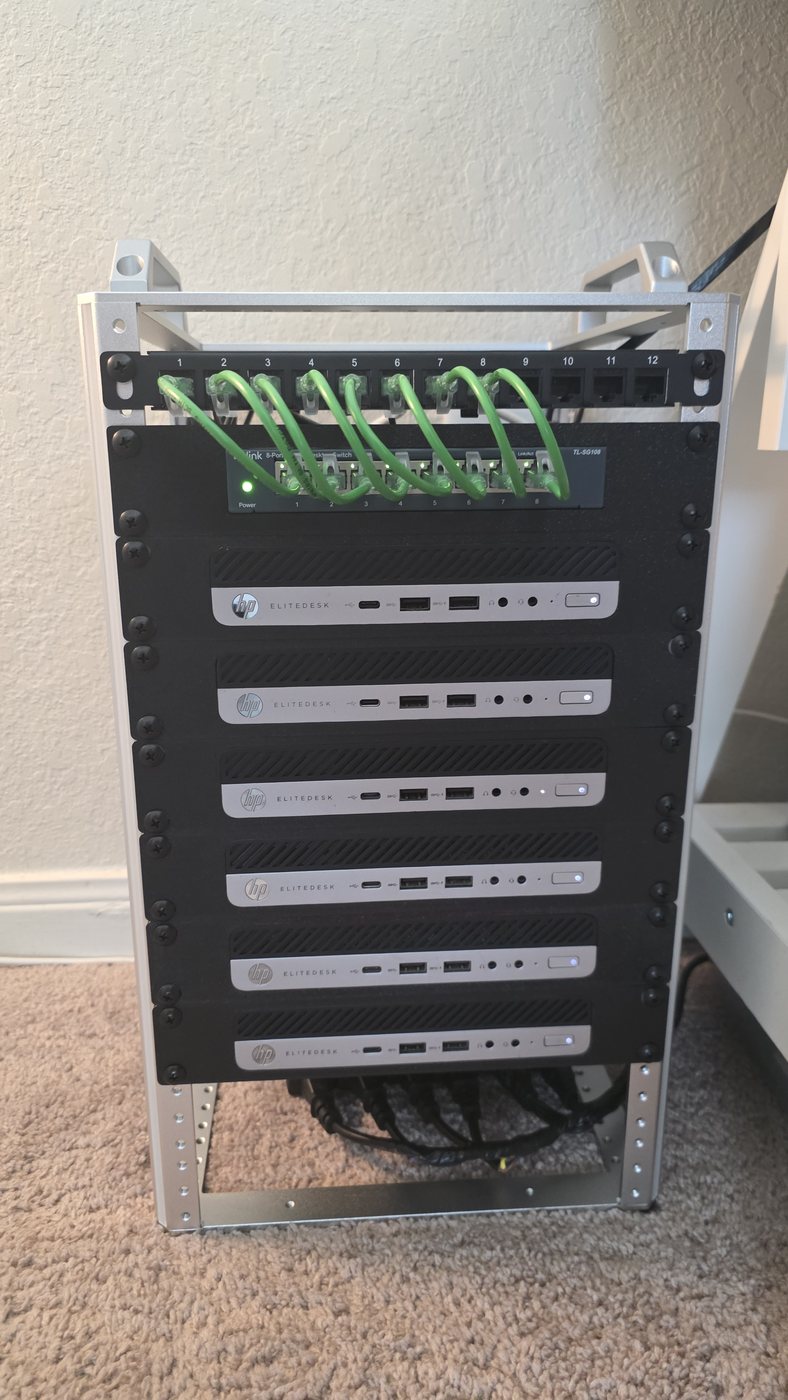
The rack was not a tidiness upgrade. It was the fix. Six 1U trays, $86.06, ordered on 29 July while I was still convinced the problem was a disk.
The outage's real lesson had nothing to do with hardware
While master was dark, two web apps belonging to my industrial-monitoring project were down. They had been down for six days and I found out by being told, not by being alerted.
Postgres was never down. It runs under CloudNativePG on a worker that never restarted, and it is published as a NodePort — port 30432 answers on every Ready node in the cluster. But the connection string named one node explicitly:
DATABASE_URL=postgres://spectra_app:***@192.168.30.10:30432/spectra_app

Error: connect EHOSTUNREACH 192.168.30.10:30432
The app had one known door into a database with six of them. Repointing it at .30.11 fixed it in about a minute.
Then I went looking, and found the identical hardcode in three more places: the off-box etcd snapshot job, a Prometheus widget on my dashboard host, and that host's own kubeconfig — all silently broken since the outage, all logging errors nobody read.
And the reason six days passed: the site never stopped answering. The root URL returned a clean redirect to a login page that renders before any query runs. Any uptime check pointed at the root URL stayed green for the entire outage. A health check that does not touch the database is a health check for your reverse proxy.
How the whole thing is wired, including the paths that only matter when something is broken

The dashed path is the one that matters at 2 a.m. Intel AMT lives in the network controller, so it answers on a machine whose operating system is gone — every BIOS on this fleet was updated over it, remotely, without opening the rack.
The fleet, node by node, as it stands today
All six are the same chassis — HP EliteDesk 800 G3 Desktop Mini — but they arrived in two thermal variants and with whatever CPU the seller had fitted. Standardising them took until 16 August 2026.
| Node | IP | Chassis | CPU | Threads | RAM | NVMe |
|---|---|---|---|---|---|---|
| k3s-master | .30.10 | DM 65 W | i5-7500T | 4c / 4t | 16 GB | 238 GB |
| k3s-master2 | .30.11 | DM 65 W | i5-7500T | 4c / 4t | 8 GB | 238 GB |
| k3s-master3 | .30.12 | DM 35 W | i5-7500T | 4c / 4t | 8 GB | 238 GB |
| k3s-worker1 | .30.20 | DM 35 W | i7-7700T | 4c / 8t | 32 GB | 238 GB |
| k3s-worker2 | .30.21 | DM 35 W | i7-7700T | 4c / 8t | 32 GB | 238 GB |
| k3s-worker3 | .30.22 | DM 65 W | i7-7700T | 4c / 8t | 32 GB | 238 GB |
| Cluster | — | 6 × DM | Kaby Lake | 36 vCPU | 128 GB | 1.4 TB |
Every node runs the identical software image: Ubuntu 24.04.4 LTS, kernel 6.8.0-137, k3s v1.33.8, containerd 2.1.5, flannel, and a single 1 GbE onboard NIC untagged into VLAN 30.
Standardising the fleet mattered more than making any part of it faster
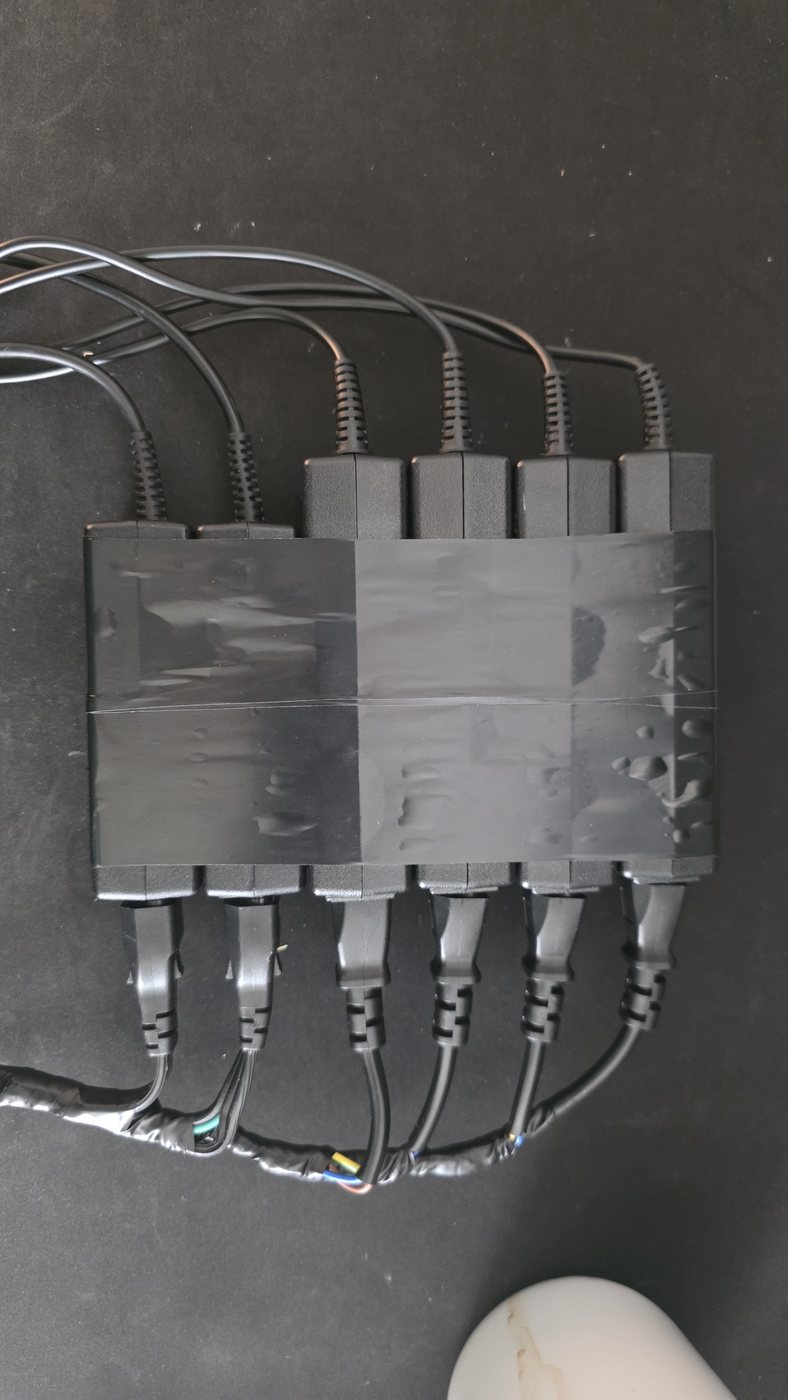
Two constraints drove every hardware decision, and neither is negotiable. Upgrades happen in $12-sized steps, not fleet-wide sweeps. And the plan is to retire six individual HP power bricks in favour of one 330 W supply for the whole rack — which makes total power draw a hard ceiling rather than a preference.
That ceiling is what rules out 65 W CPUs, even in the three chassis that would physically accept them. The number that matters is not idle draw (10–15 W a node); it is a simultaneous cold start, six machines POSTing at once after a power cut, which is the one moment they all pull near their rating together.
| Fleet configuration | Nominal draw | Headroom on 330 W |
|---|---|---|
| Original mix — 3×65 W + 3×35 W | 300 W | 9% — did not fit |
| Part-way — 2×65 W + 4×35 W | 270 W | 18% |
| Today — 6×35 W | 210 W | 36% |
Three CPU swaps and one memory shuffle got there, for $80.04 in parts — one order, placed on 10 August. Two masters gave up up to 700 MHz of base clock in the process, which sounds like a regression and is not: etcd is bound by disk fsync latency, not CPU frequency, and the masters sit at 7–12% CPU. Meanwhile the workers went from 20 to 24 allocatable vCPU, because worker3's ancient Skylake i5 was replaced by an i7 with twice the threads.
The quieter win is symmetry: three identical masters, three identical workers, one microarchitecture, one memory speed. Scheduling stops being skewed and any node is interchangeable with its twin. Two Skylake parts also disappeared, which let two nodes recover the DDR4-2400 their modules were always rated for — their memory controllers had been the cap, not the RAM.
Everything the cluster picked up, in the order it arrived
I never planned this list. Each namespace exists because something needed a home, and the cluster was the cheapest place to put it.
| When | What landed | Why it mattered |
|---|---|---|
| 2025-09 | The cluster itself | Part 1 — 1 master, 2 workers |
| 2025-10 | Rancher + Fleet | A UI over the cluster |
| 2025-11 | k3s-worker3 joins | First capacity added |
| 2025-12 | Mealie | The first thing the family used |
| 2026-01 | Prometheus + Grafana, cloudflared | Monitoring, and public access with zero open ports |
| 2026-02 | Longhorn, CloudNativePG, registry | Real storage and real databases |
| 2026-06 | ntfy, industrial monitoring apps | Alerting, and the first paying-work workload |
| 2026-07 | AdGuard ×3, ChirpStack LoRaWAN | DNS for the whole house; IoT gateway |
| 2026-07 | SQLite → etcd, 3-master HA | The structural change |
| 2026-08 | OpenProject, InvenTree, n8n | The consultancy's own tooling |
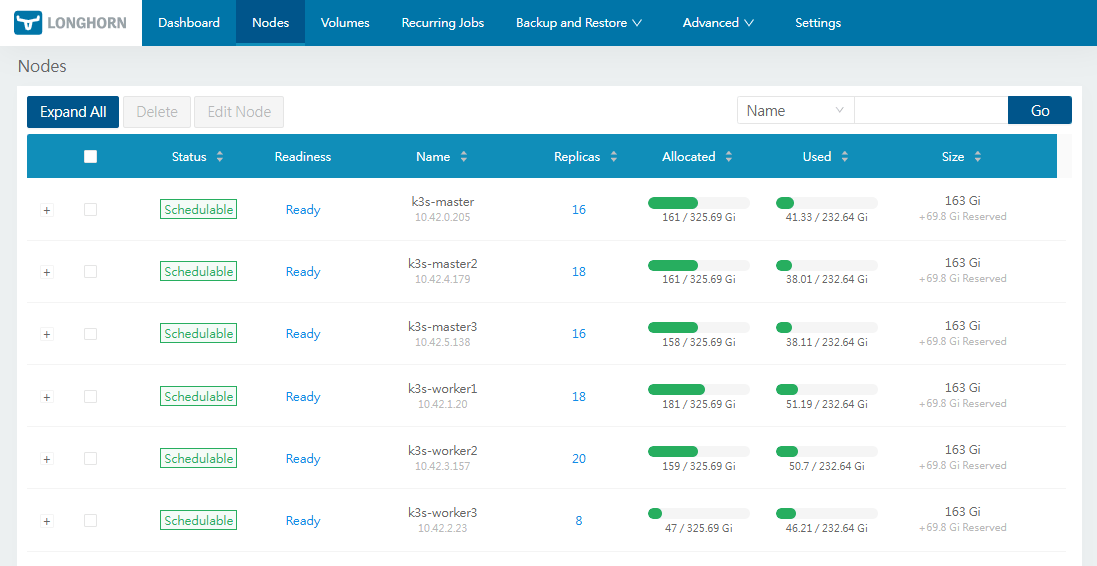
Today that is 35 namespaces and 106 running pods, on 32 Longhorn volumes with three replicas each, and seven Postgres clusters under CloudNativePG — six of them three-instance and reporting healthy as I write this.
When I needed two more control planes I went shopping. I should have looked under my son's desk
I did not buy six machines for this cluster. I bought five, both times in 2025, and one of them was never meant for the cluster at all.
- September 2025 — a lot of three, mixed i5-6500 and i5-7500, 8 GB each, no drives. $139.64 for all three. That is Part 1's cluster.
- October 2025 — two 35 W barebones, no CPU, no RAM, no disk, $69.26 the pair. One became
k3s-worker3in November. The other I built up as a desktop for my son.
Then in July 2026 the single control plane had to become three, and I went looking for hardware the way you do: a fortnight of pricing Raspberry Pi clusters, newer mini PCs, anything that looked like a control-plane node. Compute per watt, compute per dollar, spreadsheets.
Then I stopped and asked what I was actually doing. I already owned one of the two machines I needed. It was under my son's desk, running as his PC. One more identical unit — $59.99 on 11 July — finished the control plane, and the fleet was six of the same thing.
I thought at the time that this was the cheap option. It was, but that is not why it was right. The payoff was uniformity, and it arrived later than the decision did. One BIOS image covers all six machines. One AMT procedure. One CPU part number per role. The remote firmware pass that let me update every node without opening the rack worked because there was one machine to learn rather than four — a Pi cluster and two generations of mini PC would have meant four separate out-of-band stories, and Raspberry Pis have no AMT at all.
Which is the whole argument for this class of hardware in one sentence: the machine did not need to be a server. It needed to be identical to the other five.
What eleven months of this actually cost
| Item | What it bought | Cost |
|---|---|---|
| Part 1 — 3 nodes, NVMe, PSUs, CMOS cells | The original cluster | $240 |
| 2 × EliteDesk Mini, barebone | Oct 2025 — worker3, and my son's desktop | $69.26 |
| 2 × Intel i7-7700T | Oct 2025 — the workers | $143.97 |
| TP-Link TL-SG108, 8-port | Oct 2025 — the rack's own switch | $18.99 |
| 6 × 16 GB DDR4-2400 SODIMM | Nov 2025 — 96 GB, the workers to 32 each | $230.50 |
| 2 × Samsung 256 GB NVMe | Nov 2025 — a third was already on the shelf | $38.95 |
| 3 × power supply | $11.79 each, bought as machines arrived | $35.37 |
| 1 × EliteDesk Mini, i5-7500T | Jul 2026 — the third control plane | $59.99 |
| 1 × DeskPi RackMate TL1, 10″ 10U | Jul 2026 — the frame all of it hangs on | $79.99 |
| 6 × 1U rack tray + switch mount | Jul 2026 — the fix for the outage | $103.02 |
| Patch panel, screws, patch cables | Jul–Aug 2026 — 12-port 0.5U, 30 cage screws, 20 slim Cat6 | $44.74 |
| Vented 2U blank panel | Aug 2026 — a fan mount, bought after the thermal outage | $17.31 |
| 1 × i7-7700T, 2 × i5-7500T | Aug 2026 — the whole fleet to 35 W | $68.14 |
| 1 × 4 GB DDR4-2400 SODIMM | Aug 2026 — all three masters dual-channel | $11.90 |
| 6 × DisplayPort dummy plug | Aug 2026 — AMT remote KVM on headless nodes | $18.00 |
| Two years, every line receipted | 36 vCPU · 128 GB · 3-master HA | $1,179.77 |
That is the whole thing, receipt by receipt, and it is not the number I had in my head. I would have guessed six hundred. The memory alone is a fifth of it; the two i7s I bought in 2025 cost more than the rack, the trays and the third control plane put together; and the last $62 is patch panel, cage screws and cables — the parts nobody photographs and everybody forgets to count.
One line in there is the outage still being paid for. The vented 2U panel is a fan mount, ordered the same week the rack went in. I had just spent a fortnight proving that these machines fail when they cannot breathe, and I was not going to find that out twice.
The out-of-band management deserves its own line, because it is the item where second-hand office hardware quietly beats the purpose-built alternative. Six IP KVM devices, priced this month, run $103 each — and most of them do not include remote power, which is half the reason you want one. Intel AMT was already inside every one of these machines. Switching it on cost $18 in dummy plugs, total, for all six.
It cost about what a laptop costs. It is not a laptop
Rebuilding this fleet today, priced on 18 August 2026, comes to $1,029–1,486 — give or take, what it cost. Two-year-old second-hand hardware that has not lost value is unusual, and it is not sentiment. It is the memory market.
| Component | What the fleet holds | Today |
|---|---|---|
| DDR4-2400 SODIMM | 128 GB across 12 modules | $480 – 700 |
| EliteDesk Minis, bare | 6 × chassis, CPU, supply | $210 – 360 |
| NVMe M.2 | 6 × 238 GB | $108 – 180 |
| Trays and switch mount | 6 + 1 | $103 |
| Rack, switch, patch panel, plugs | — | $128 – 143 |
| Replacement cost | vs. $1,179.77 spent | $1,029 – 1,486 |
One line in that table did move, and sharply. The 96 GB in the workers — six 16 GB modules, $230.50 in November 2025 — is worth $360–510 today. A 32 GB DDR4 kit that was about $50 in early 2025 sells for $150–240 now, DDR4 rose another 50% in the quarter I am writing this, and the shortage is forecast to run into at least Q4 2027. Fab capacity went to HBM and DDR5 for AI and it is not coming back soon.
But the delta is the least interesting number here, so let me put the honest one up. This cost about what a mid-range laptop costs. For that:
- Six machines, 36 vCPU and 128 GB of RAM, every node identical to its twin.
- A three-node etcd control plane that survives losing a machine without anyone being told.
- 32 replicated volumes across three copies, backed off-site nightly, and seven Postgres clusters — six of them three-instance — under an operator that fails them over on its own.
- Out-of-band management on all six, so firmware, BIOS and a dead OS are all fixable without walking to the rack.
And it is not a lab. Today that cluster answers DNS for every device in the house, runs a LoRaWAN gateway, and carries my consultancy's project management, inventory and automation — alongside an industrial monitoring product with real users on it. It is doing the job a small company's infrastructure does, because it is a small company's infrastructure.
So the point was never that it was cheap. At $1,500 I would do it again without pausing, and that is the comparison worth making: not against a cheaper cluster, but against the single laptop you would otherwise have bought with the same money.
Two caveats, because "value" gets used to mean two different things. Replacement cost — the $1,029–1,486 — is what a fire actually costs to undo, and it is the number that matters. Resale is lower and harder to reach: parted out, perhaps $565–1,040; sold whole, considerably less, because the market for an assembled six-node K3s cluster is roughly one person and that person wants to build it themselves.
Where this is genuinely worse, because it is not a clean win
- The single-PSU plan reintroduces the failure I just designed out. One supply for six nodes means one component can take down all three etcd members at once. The HA design assumes independent failures; a shared supply removes that assumption. It has to sit on the UPS, and a spare has to exist before the individual bricks are given away.
- One node still has an unpatched ME firmware vulnerability — a LAN-local authentication bypass, CVSS 9.8, reachable only because AMT is switched on. It is accepted, not overlooked: the network segment is trusted, and patching it needs a rack visit I have not scheduled.
- Every node has an empty SATA bay. OS, container images and all Longhorn data share one M.2 drive, so a single dead NVMe still takes a whole node. The caddies are on hand; the work is deferred because the I/O split would not be measurable yet.
- There is still one hardcoded node IP in my own kubeconfig. After everything above, the tooling on my control host points at master2 specifically rather than a name. If that node dies I get to repeat the exercise.
- Nothing here is GitOps yet. The manifests are in git and applied by hand. Fleet is installed and dormant. That is the next real project, and the hard prerequisite is secrets management, not the deployment tool.
What I would actually take from this
The most useful things I learned in eleven months are all things I had written down as true and weren't:
- "A node that powers on but never reaches the network has a hardware fault." Sometimes it has a blocked vent. Check the cheap physical explanation before ordering the interesting part — and notice when you abandon a correct early reading for a more exciting one.
- "Three masters means I can lose one, so four means I can lose two." Four means you can still only lose one. Quorum is a majority, and it goes up when you add members.
- "The service is up, the check is green." A check that never touches the database is a check on your reverse proxy. Six days of outage hid behind a login page that renders before any query runs.
- "NodePort answers everywhere, so naming one node is harmless." It is harmless right up until that node is the one that dies. Four separate configs in my lab had the same literal IP in them.
- "No configuration for it means it isn't happening." A script on a timer leaves no trace in the cluster's own resources. Absence of config is not absence of behaviour.
- "Second-hand hardware only depreciates." The machines did. The memory inside them did not — 96 GB bought for $230.50 in November 2025 is worth $360–510 today, and it dragged the whole fleet back to roughly break-even. When the parts inside a machine appreciate faster than the machine depreciates, the rule stops holding.
Part 1 was about getting three machines to say Ready. Part 2 is about the gap between that and a cluster you would put something you care about on — and almost all of that gap turned out to be quorum arithmetic, airflow, and health checks that actually check something.