One memory slot. Two motherboards. Three months of "it's the platform". The fix was two pins and nail polish.
The second node in my Proxmox cluster has one job: when the first node dies, it takes over. Eight services fail over to it, restarted from replicas that a 25 Gb/s direct cable between the two nodes keeps fresh every 5 to 15 minutes. It's a second-hand Dell OptiPlex 5050 with a quad-core i7-6700 and a Mellanox ConnectX-4 Lx card for that cable. And since August it had been running with one of its four memory slots empty, because that slot was dead.
Except it never was.
A slot that failed on two motherboards
Four 16 GB modules in, and the machine wouldn't POST: no video, just Dell's 2 amber + 7 blink code on the power button. Any three modules booted. Four never did.
So I did what you do with a dead slot and replaced the motherboard. The new board arrived on August 29 and failed exactly the same way. Two boards, two CPUs, the latest BIOS Dell ever published for the 5050, every module I owned. Three boot, four never POST.
Dell's community forum had the same story on sibling models. One 5050 owner on an i5-6500 booted any three 8 GB modules and refused four, "regardless of which RAM I use and which DIMM slot I used". A 5060 owner failed 4 × 16 GB with two different kits. It was the same blink code in both threads, and neither got an answer from Dell. On September 10 I closed the case: 48 GB is this platform's ceiling, and no more RAM goes into this chassis, ever.
Then the same card hung a different computer
On November 5 I tried to retire the OptiPlex by moving node 2 into the HP EliteDesk 800 G6 that was my desktop: eight cores, 64 GB. The ConnectX-4 went in and the HP never POSTed. Not in either slot, not even with the card's option ROM disabled. I rolled everything back that night.
Two brands, two chipsets, two generations of Intel, and the same part kept both machines from starting. When a failure follows a part from one machine to another, that part is the lead.
Memory has a name tag, and it hangs on a shared bus
Before memory can work, the BIOS has to know what's in each slot: size, speed, timings. Every DDR4 module carries that information in a small EEPROM called the SPD, and the BIOS reads it over the SMBus, a slow two-wire bus that runs around the motherboard. Each slot is hard-wired to its own address on that bus. On a four-slot DDR4 board those are 0x50 to 0x53.
The same bus also reaches the PCIe slots, on two fingers of the card's edge connector: B5 (clock) and B6 (data). In a server, that's how a management controller talks to add-in cards. In a desktop nothing uses them, but they're wired anyway.
Reading the bus
So on November 6 I stopped swapping parts and read the bus. I ran it on node 2 with the card installed, three modules in and slot 4 empty, using read-only probes of every SPD address:
| Address | What answered |
|---|---|
0x50 | A memory module's SPD |
0x51 | A memory module's SPD |
0x52 | The ConnectX-4. An IPMI FRU record: MLNX 25GbE 2P ConnectX4LX Adpt, DELL, part 020NJDA06A |
0x53 | A memory module's SPD |
0x52 is DIMM4's address on this board, the "dead" slot. My card is Dell-branded, and it carries an FRU EEPROM: an inventory chip holding its part and serial numbers. On a PowerEdge server, the management controller uses it to identify the card. In an OptiPlex nothing ever asks, but the chip still sits on the bus, at the one address that belongs to slot 4.
Linux had noticed before I did. The kernel counts the populated memory slots and attaches its SPD driver to that many addresses, counting up from 0x50. With three modules installed, it took 0x50, 0x51 and 0x52, then stopped. The memory driver was attached to the network card:
strings /sys/bus/i2c/devices/0-0052/eeprom # prints the card's name and Dell part number
Put a module in slot 4 and two chips answer at 0x52. The SMBus is open-drain: any device can pull a line low and none can drive it high, so when two devices answer at once, the BIOS reads the bitwise AND of both. The result is a module description that describes nothing. Memory training fails and the machine stops before video. That's the 2 amber + 7. With the slot empty, the only thing at 0x52 is a record that doesn't look like memory, and the BIOS carries on without it.
The EliteDesk hit the same collision on a different slot. Its address map puts 0x52 on DIMM3, and that night all four of its slots were full.
Two pins and some nail polish
The fix is to take the card off that bus by insulating its B5 and B6 fingers so they never touch the slot. Every other finger stays bare, so the card itself works exactly as before.
I didn't invent this. On Dell's forum there's a thread about exactly this symptom on an OptiPlex 7060: any PCIe network card plus slot 4 means no POST. In that thread, an OptiPlex 7070 owner masked B5 and B6 and ran 128 GB alongside a 10G card.
The textbook material for this is Kapton tape. I used painter's tape as a stencil, leaving a narrow gap over B5 and B6, and brushed nail polish through it.
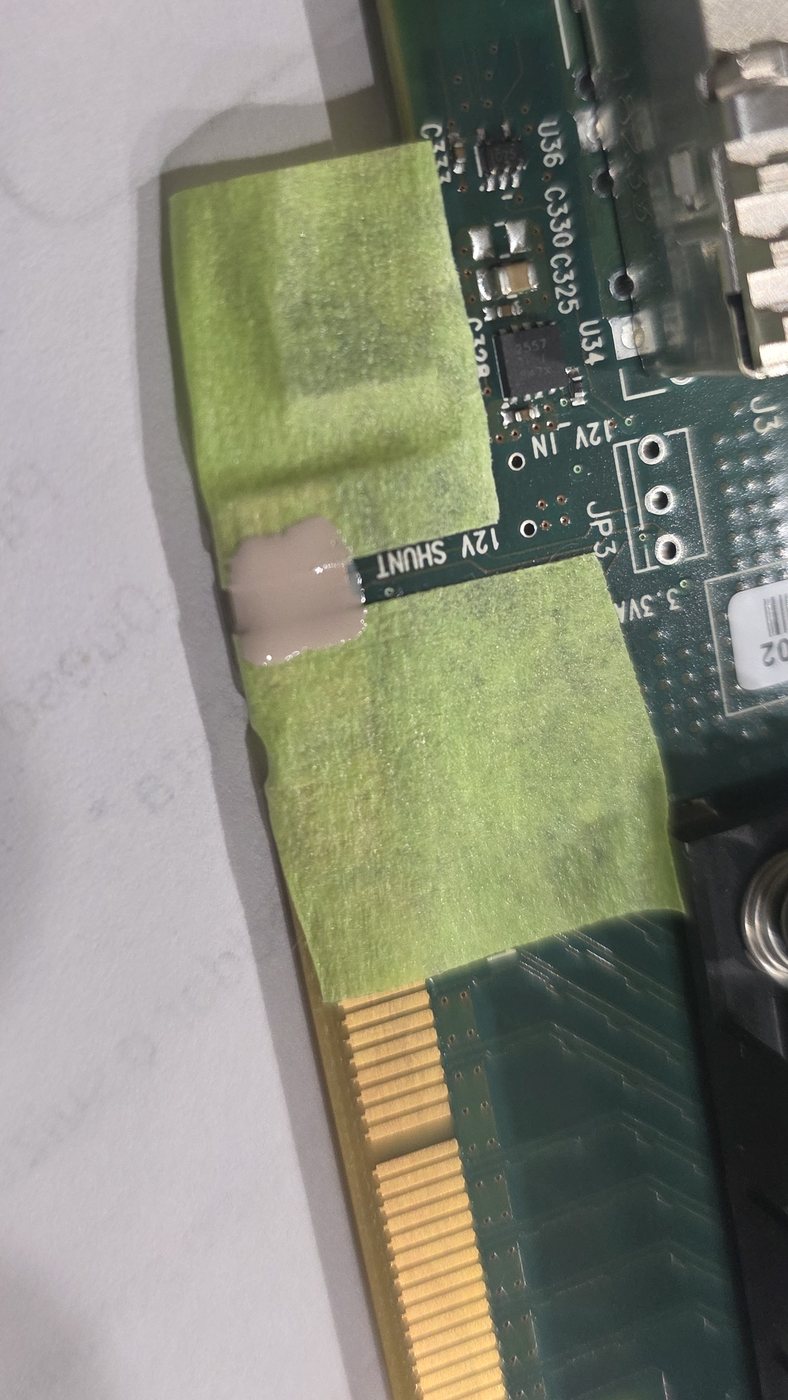
Four slots and the card, together for the first time
On November 8 I read the machine live over SSH after every step:
| Step | Hardware | Result |
|---|---|---|
| 1 | Card out, four modules | POST, 56 GB. The fourth slot was never dead |
| 2 | Card back in the x16 slot with B5/B6 masked, same four modules | POST, 56 GB. 0x52 is a memory module again, and the card has vanished from the SMBus entirely |
| 3 | The 25G cable back on | Link at PCIe x8 Gen3 and 25 Gb/s, 0.16 ms to node 1, the cluster's second ring connected |
It's 56 rather than 64 because the fourth module I had on hand was an 8 GB one.
Capacity is why this matters. The failover set is eight guests with 50 GiB configured. Usable memory on node 2 is what's left after ZFS's cache and the host take their share:
| What node 2 would have to hold | At 48 GB (39.8 GiB usable) | At 56 GB (47.8 GiB usable) |
|---|---|---|
| The guests as they run today, ~35 GiB | +5 | +13 |
| VMs at full allocation, ~41 GiB | −1.2 | +7 |
| Every guest at its configured limit, 50 GiB | −10 | −2 |
At 48 GB, the failover node couldn't hold the full set it exists for. At 56 GB it can.
What it costs, honestly
- It's a mechanical fix on the node that's supposed to be the reliable one. Three days earlier I had turned down tape for exactly that reason. A film of nail polish can chip when the card is reseated, so every reseat now includes an inspection.
- The 56 GB is a mixed set: two Timetec 2400, one SK Hynix 2666 and the 8 GB ADATA. The i7-6700 runs them all at 2133 MT/s regardless. The odd 8 GB module leaves the two channels unequal, so not all of the memory runs dual-channel.
- Validation isn't finished. Four
memtesterruns covering about 40 GiB show zero errors so far. A full memtest86+ pass is still pending, and it needs a monitor on a machine with no remote KVM. - I bought a motherboard I didn't need.
Next: 64 GB, and the kit that started this
My desktop runs four identical Micron 16 GB dual-rank modules, the same kit that refused to POST in node 2 in August. The plan is to swap them. Node 2 gets the four Micron modules: 64 GB, matched, full dual-channel. The desktop takes the mixed set, and with no ConnectX in it there's nothing at 0x52 to collide with.
That's the real test. Today's fourth module is single-rank. Four dual-rank Micron modules are the exact population that failed in August. If they POST alongside the masked card, the August mystery is closed for good. At 64 GB the failover node also covers the every-guest-at-its-limit case, with about 6 GiB to spare.
I'll update this post when it's done, with the result and the memtest86+ pass.
Check your own machine
This is the probe that found it. It's read-only: it sends one "read byte" to each address from 0x50 to 0x57 and reports what answers. Never write to these addresses. A write to an SPD can permanently damage a module. Run it as root on the host:
modprobe -a i2c-dev i2c-i801                 # Intel chipsets; AMD uses i2c-piix4
grep . /sys/bus/i2c/devices/i2c-*/name       # find the "SMBus I801" adapter; mine is i2c-0
python3 - <<'EOF'
import fcntl, os, ctypes
BUS = "/dev/i2c-0"   # the SMBus adapter found above
class D(ctypes.Union): _fields_=[("byte",ctypes.c_uint8),("word",ctypes.c_uint16),("block",ctypes.c_uint8*34)]
class A(ctypes.Structure): _fields_=[("rw",ctypes.c_uint8),("cmd",ctypes.c_uint8),("size",ctypes.c_uint32),("data",ctypes.POINTER(D))]
fd = os.open(BUS, os.O_RDWR)
for a in range(0x50, 0x58):
    fcntl.ioctl(fd, 0x0706, a)                                    # I2C_SLAVE_FORCE
    d = D()
    try:
        fcntl.ioctl(fd, 0x0720, A(1, 0, 1, ctypes.pointer(d)))    # SMBus read byte
        print(hex(a), "answers")
    except OSError:
        print(hex(a), "-")
EOF
If something answers at the address of a slot you're leaving empty, find out what it is before you fill that slot.
What I'd take from this
- "Bad slot" was a conclusion I filed as an observation. The observation was narrower: with the machine as built, a fourth module won't POST. Everything installed was a suspect, and I had only listed the memory.
- When a failure follows a part between machines, follow the part. The OptiPlex and the EliteDesk had almost nothing in common except that card.
- Read the bus before buying hardware. A twenty-line read-only probe answered what a replacement motherboard and a month of swapping modules didn't.
- An unanswered forum thread isn't evidence of a platform limit. Two of them convinced me in September. A third, found after reading the bus, had the fix in it.
- If you run a ConnectX-4 Lx, or any card with an FRU chip on the slot's SMBus, in a four-slot DDR4 desktop: find out which slot sits at
0x52. Leave it empty, or mask B5 and B6.